
Compare
A Fathom alternative that keeps the record on your machine
Fathom is a polished, generous AI notetaker — free unlimited recordings are hard to argue with. Proofaro is for the people that generosity does not settle: those who need the recording kept on their own computer, transcription that works fully offline after a one-time setup download, and documents checked against what was actually said.
Meet Fathom
Fathom calls itself an AI meeting partner that captures, transcribes and summarises meetings across Zoom, Google Meet, Microsoft Teams and Slack Huddles. It can capture three ways: the Fathom Notetaker joins your call as a visible participant, its Mac desktop app can capture bot-free (in beta), and its iPhone app records in-person conversations. Afterwards you get instant AI summaries, highlight clips and playlists, and Ask Fathom to answer questions across your calls. Notes sync to Salesforce, HubSpot, Slack, Notion and Asana, and the free plan is unusually generous: unlimited recordings and transcriptions at no cost.
The catch is in Fathom's own help centre: everything is stored by Fathom in the US, an internet connection is required, and — in its words — "Offline recording is not available." If your work happens where the internet does not, or the record cannot live on someone else's servers, that settles the choice the other way.
Side by side
| Proofaro | Fathom | |
|---|---|---|
| A bot joins your meeting | Never — capture happens on your own computer | The Fathom Notetaker joins as a visible participant — or capture bot-free from the Mac desktop app (in beta); on Teams, capture is bot-only |
| Where transcription happens | On your computer | Processed by Fathom — recordings are stored in Fathom's cloud in the US, and its help centre states an internet connection is required to capture and process |
| Works fully offline | Yes, after a one-time setup download | No — Fathom's help centre states plainly: “Offline recording is not available” |
| The meeting recording | Kept on your computer — replay the exact words any time | Video, audio and transcript kept in Fathom, stored indefinitely until you delete them, with clips and playlists built in |
| Checks documents against what was said | Yes — Said vs Written flags changed numbers, dates and promises, with the original quote as evidence | No equivalent described in Fathom's docs (checked November 2026) |
| Integrations and team tools | Deliberately few — Proofaro works on your machine, not inside your CRM | Salesforce, HubSpot, Slack, Notion, Asana and Zapier, plus Ask Fathom and trackers across team calls |
| Operating systems | Mac, Windows and Linux | Mac and Windows computers; its help centre lists Linux among the platforms it does not support |
| Mobile apps | Not yet — desktop only for now | iPhone app for in-person capture; no Android app |
| Availability | Invite-only early access | Anyone can sign up today — free plan with unlimited recordings and transcriptions |
Fathom details are based on Fathom's public documentation, checked November 2026. Sources: Fathom's flexible capture page (three capture modes; the Notetaker is a visible attendee) and bot-free capture page (Mac desktop app, in beta), its help centre on the iOS app (internet required; “Offline recording is not available”; iOS only), on recording storage (recordings stored indefinitely until deleted) and on supported computers (Linux not supported), and Fathom's pricing page (free plan; unlimited recordings and transcription). Fathom is a trademark of its owner; this page is a comparison, not an affiliation.
Comparing more tools? See the full comparison hub — including Proofaro vs Granola.
When Proofaro is the better fit
You work offline
Flights, secure facilities, client sites with no guest Wi-Fi worth trusting — your meetings do not stop for a connection, and neither does the transcription. Proofaro runs on your computer, fully offline after a one-time setup download, so the plane lands and your notes are already done. Nothing waits on an upload; nothing sits in a queue hoping the network comes back. See offline meeting notes.
You need the receipts
The recording and the exact words stay on your machine, so “who agreed what” stops being an argument and becomes a lookup: find the moment, read the quote, play it back. And if a disagreement ever turns serious, you can hand over a self-verifying evidence pack — an export the other side can check for tampering, built from your own record, not from memory.
Mistakes cost you money
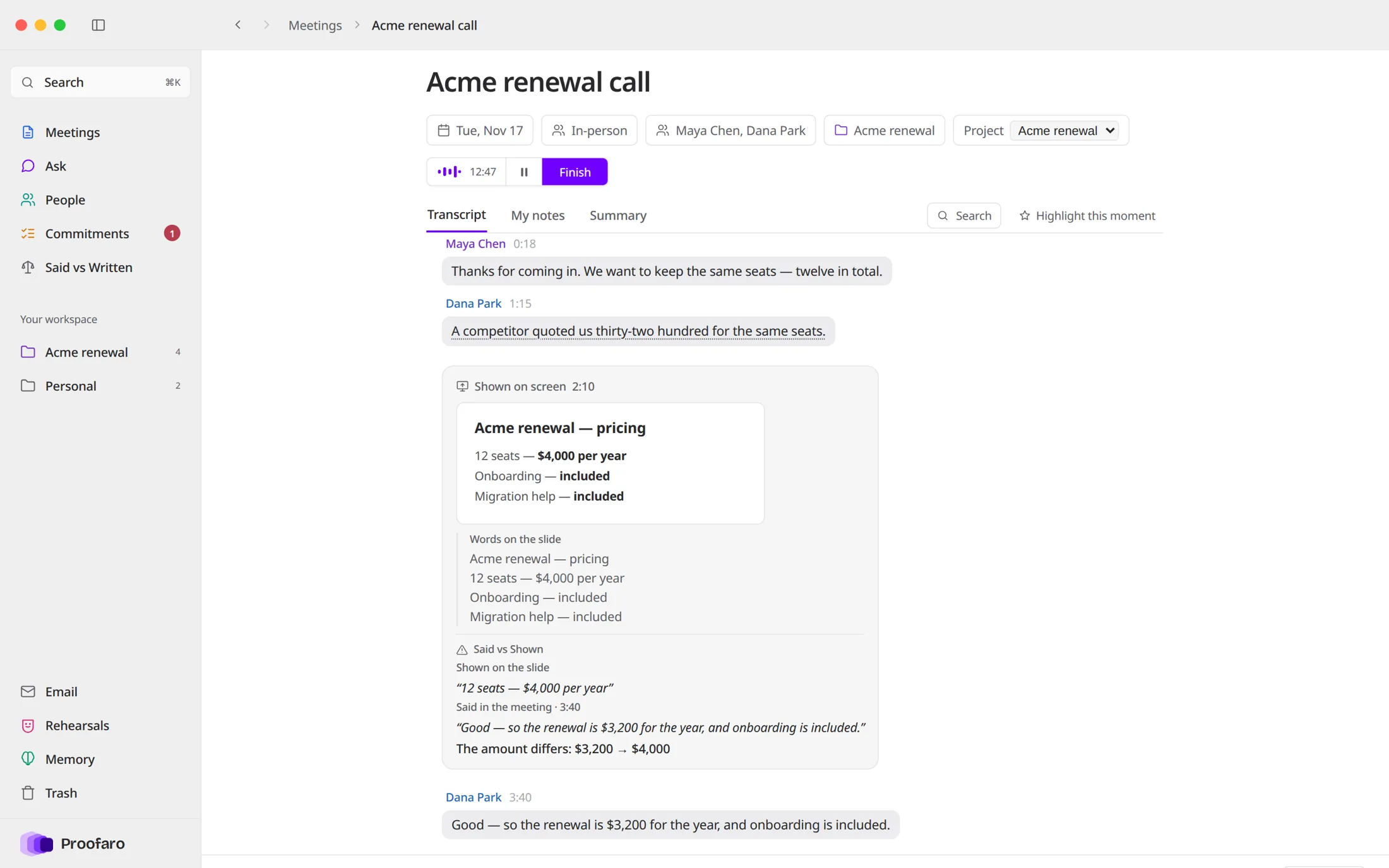
In the meeting, the renewal was agreed at $4,000 with onboarding included. The quote that arrives says $3,200 — with onboarding billed separately. (An example, but a pattern anyone in sales or procurement will recognise.) Bring Proofaro the quote, contract or follow-up, and the check runs as soon as you bring it: changed numbers, dates and promises are flagged against the original words, and a response draft is prepared for your review — never sent on its own. See Said vs Written and commitment tracking.
Your mornings start ahead
This is the habit that sticks. You sit down with your coffee and Proofaro has already done the homework: today’s brief is ready, yesterday’s documents have been checked against yesterday’s words, and the follow-up drafts are waiting in your Morning Queue for a tap. Your work is ready before you are — you start the day approving, not digging.
Your meetings mix languages
Plenty of real meetings switch mid-sentence — English with Hindi, English with Spanish. Proofaro locks the transcription language for the whole meeting, so the record stays clean instead of flipping between languages line by line, and your summaries can come back in English, Spanish or Hindi. The meeting sounds like your team actually talks, and the notes still read clearly.
A bot in the meeting changes the meeting
The moment a recording bot joins, people talk differently — clients go careful, candidates go quiet. No bot ever joins a Proofaro meeting. People talk freely, and the recordings and transcripts stay on your computer, never uploaded for processing. For client-confidential work, that is not a nice-to-have; it is the whole point.
Proofaro doesn’t just remember what happened. It helps catch what could go wrong next — and that is why, once it has caught one real mistake for you, checking it becomes part of the day.
Questions people ask
Fathom is free with unlimited recordings — why switch?
If Fathom's cloud works for you, honestly, it may not be worth switching. The reasons people look at Proofaro are the ones Fathom cannot change: its recordings live in Fathom's US cloud, it needs the internet, and it cannot check a quote or contract against what was said. Proofaro is also free during early access.
Does Fathom work offline?
No. Fathom's help centre says an internet connection is required to capture, and states that offline recording is not available. Proofaro transcribes on your computer, fully offline after a one-time setup download.
Is Fathom really bot-free?
Partly: its Mac desktop app can capture without the Notetaker joining, and that mode is in beta; on Microsoft Teams the Notetaker is the only route. With Proofaro there is no bot on any platform, because capture happens on your machine.
Does Fathom have an Android app?
No — Fathom's mobile app is iPhone only, for in-person capture. Proofaro has no mobile app yet either; it is desktop-only while in early access, and this page will say so until that changes.
Try Proofaro free during early access
Proofaro is invite-only while we onboard the first users in small waves. Request an invite and we will write to you at the address you give us.